How plans work
A company is always in one of four states: trial, free, paid or courtesy. What each means, how it starts and ends, and where everyone in the company can see it.
Every company on A9 Stockroom is in exactly one of four states at a time. The app always tells you which, in a small pill under your name and on Plan & billing. Everyone in the company can see it, whatever their role.
| State | How it starts | How it ends |
|---|---|---|
| Trial | Every new company starts with 30 days of Pro, with no card. | The owner subscribes (it becomes Paid), or the 30 days run out and the company moves to Free. |
| Free | The trial ended, a courtesy plan ended, a cancellation took effect, or a payment stayed unpaid for 14 days. | The owner subscribes. |
| Paid | Only when the owner subscribes to Essentials or Pro and the payment goes through. Nothing else makes a company Paid. | A cancellation takes effect at the end of the period that was paid for, or a payment stays unpaid for 14 days. Either way the company moves to Free. |
| Courtesy | Atlas9 gives a company Essentials or Pro for a set time, as a courtesy. | On the end date the company moves to Free, unless the owner subscribes first (it becomes Paid) or Atlas9 extends it. |
Nothing is ever deleted when a company changes state. A company over the Free limits can still be viewed and exported; see When a plan ends.
What the pill says#
- "Pro · Trial, 23 days left": a trial, and how long it has to run.
- "Free", "Essentials" or "Pro": the plan, and the company pays for it.
- "Pro · Courtesy until Jan 18": a courtesy plan and its end date.
- "Pro · Ends Feb 2": a paid plan that was cancelled and ends on that date.
- "Payment problem": a payment didn't go through; everything keeps working while it is tried again.
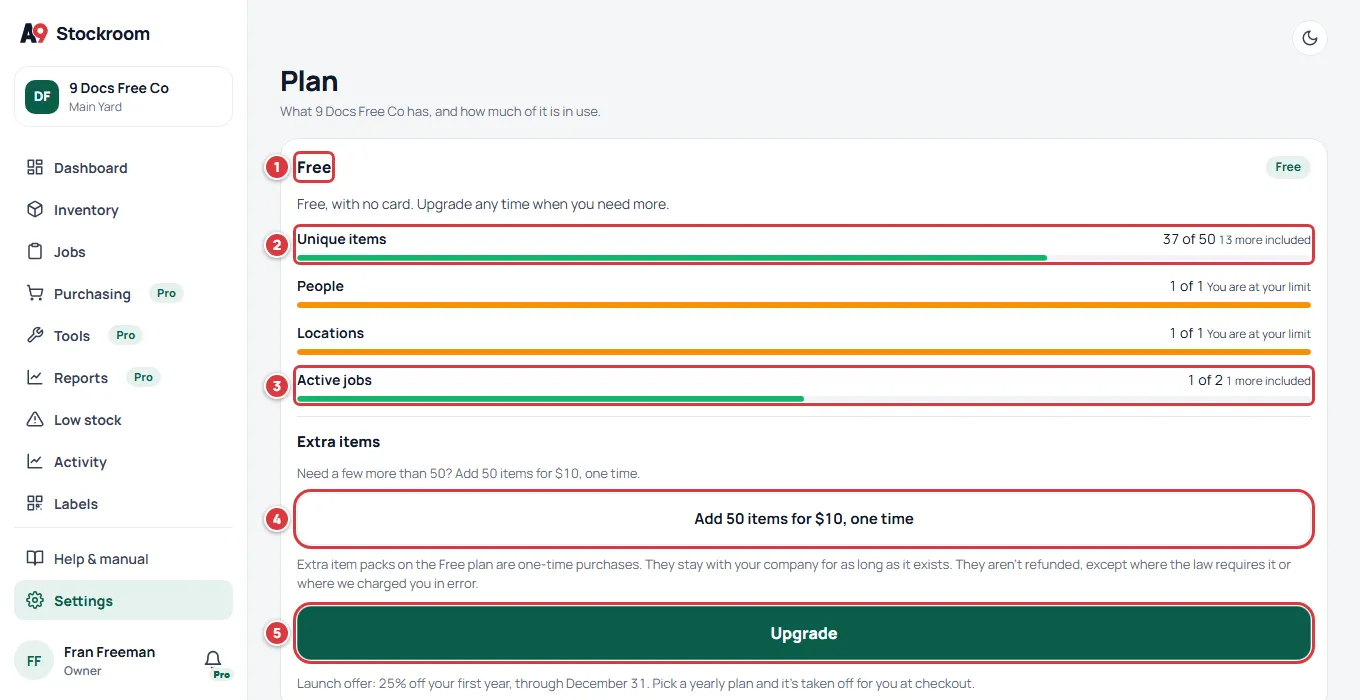
Tap the pill, or open Plan & billing in the sidebar (or in Settings on a phone), to see the dates, how much of each limit you are using and what each plan includes.
Who can do what#
The owner looks after the plan. On Plan & billing the owner can Choose a plan (monthly or yearly, with the launch offer when it is on), open Manage billing to change plan, switch to yearly, update the card or cancel, and buy the one extra item pack on Free. Everyone else reads the same page and can tap "Ask" with the owner's first name to send them a short note. When someone reaches a limit, the box that opens names the plan that lifts it and what it costs.
See Your plan for the limits and what each plan includes, and Upgrading and billing for the steps.