Privacy and security
In plain words: what A9 Stockroom keeps, who in your company can see it, how sign-in is protected, and how to get your data out or deleted.
This page explains, in everyday words, how A9 Stockroom treats your company's information. It matches the site's Privacy page and Terms, which are the official versions. If anything here seems to differ, those two pages win, and you can write to support@a9stockroom.com.
What A9 Stockroom keeps#
- Your account. Your name, your work email and your password (kept only as a one-way scramble that cannot be turned back into the password), which company you belong to and your role there.
- Your company's inventory. The folders, items, quantities, prices, jobs and history your team enters, and the photos you upload.
- Sign-in records. When you signed in and from which device, so the account can be kept safe. You can see your own devices on My account.
What you put in stays yours. A9 Stockroom stores and processes it only to run the service for you.
Who can see it#
- Only people your company invites. There is no public sign-up. Each person joins through an invite link sent to their email, and an owner or manager decides who is invited and with which role. See Team.
- Each company is kept separate. You only ever see your own company's information. Asking for something that belongs to another company gets the same answer as asking for something that does not exist: "We can't find that."
- A tech sees only their locations. Inside a company, a tech works at the locations an owner or manager gave them. They cannot see the stock, folders or jobs of the others. Owners and managers see every location. See Locations.
- Viewers can look but not change. See Roles and permissions for what each role can do.
- Changes are recorded. The owner can read the Activity log (who changed what on the team, the company and its locations), and Activity shows who took, returned or counted what. See Activity and history.
- Removing someone ends their access at once. They are signed out of every device and lose the company, and what they did stays in the history, marked as removed.
Photos#
Photos are private. They are shown only to people who are signed in to your own company, and checked against the company every time one is opened. The picture a company uses as its logo appears in the emails and printouts A9 Stockroom makes for that company.
Where it lives and how it is backed up#
The app and its database run on a server that Atlas9 operates. The database is backed up every night, and the backups are kept for 30 days. Email (invites, resets and the daily email) goes out through a mail service. The website you are reading sets no cookies and has no advertising or tracking scripts; it measures visits without cookies.
How sign-in is protected#
- Passwords. The password rules are shown when you choose one. A9 Stockroom stores only the one-way scramble, so nobody, including the people who run A9 Stockroom, can read your password. Keep it to yourself: the Terms ask you to.
- Confirmed email. An account cannot be used until its email address has been confirmed.
- Slowing down guessing. Too many wrong tries stop the sign-in for a minute: "Too many tries. Wait a minute and try again."
- Your devices. Open Settings, then My account. Under Signed-in devices you see every device you are signed in on and when it was last used. Sign out ends one, and Sign out everywhere else ends all but the one you are using. Changing your password signs out every other device too.
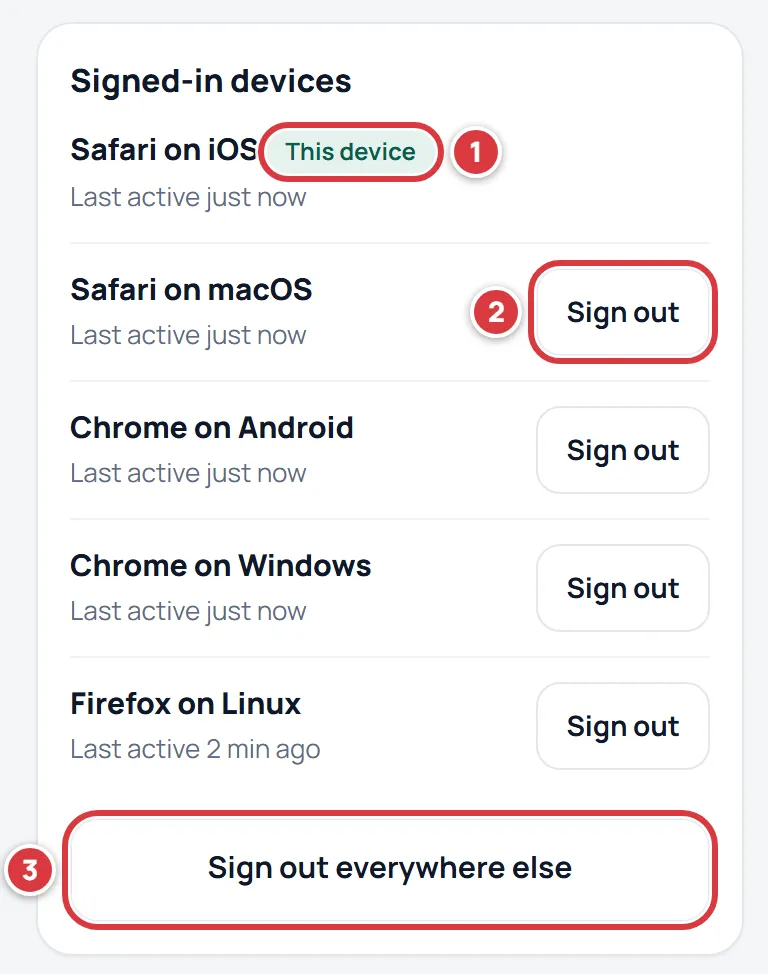
- A lost phone. Sign it out from another device, or ask an owner or manager to remove you and invite you again. The steps are in Troubleshooting and FAQ.
- Your phone's saved copy. So that scanning works with no signal, the phone keeps a copy of what you are allowed to see. It is cleared when you sign out, when you are removed from the company, or when someone else signs in on that phone.
Links in emails#
Several emails carry a link. Each one works for a limited time.
- Invite link. Works for 7 days and creates one account. Send it only to the person it is for. If it goes to the wrong person, an owner or manager taps Revoke under Pending invites on the Team screen and the link stops working.
- Password reset link. Works for a short time (the screen says how long). Resetting signs out every other device.
- Email change link. When you change your email, nothing changes until you open the link sent to the new address, which works for 24 hours. Your old address gets a note with a "this wasn't me" link that works for 7 days. It puts the old address back and signs out every device.
- Export links. The photo links in an export work for 7 days.
See My account.
Getting your data out, and deleting it#
Your company's data is yours.
- Export it yourself. The owner can open Settings, then Company, and tap Export everything: a zip with a spreadsheet file for every list. Owners and managers can also use Export all items (CSV) on Import & export. See Getting your data out.
- Ask for a full export or for deletion. Write to support@a9stockroom.com. A9 Stockroom can send a full export, delete your account, or delete your whole company's data. You are asked to confirm who you are first, and the aim is to finish within 7 days. Deleted data leaves the live system right away and ages out of the nightly backups within 30 days.
- Read-only companies. If a company's access is paused or its subscription has ended, the company becomes read-only. People can still sign in, look at everything and export it, but nothing can be added or changed. See Your plan.
What A9 Stockroom does not do#
- It does not sell your data.
- It does not show ads.
- It does not use your inventory to train anything.
Questions#
Write to support@a9stockroom.com. The official Privacy and Terms pages are on the main site.